What a New Hire Actually Sees on Day One: A Walkthrough of the Architecture Insight Page
A concrete, screen-by-screen walkthrough of what jsdoc-scribe's automatic Architecture Insight page shows a new engineer, and why it replaces the "grab a senior engineer and ask them to explain the codebase" ritual most teams still run.
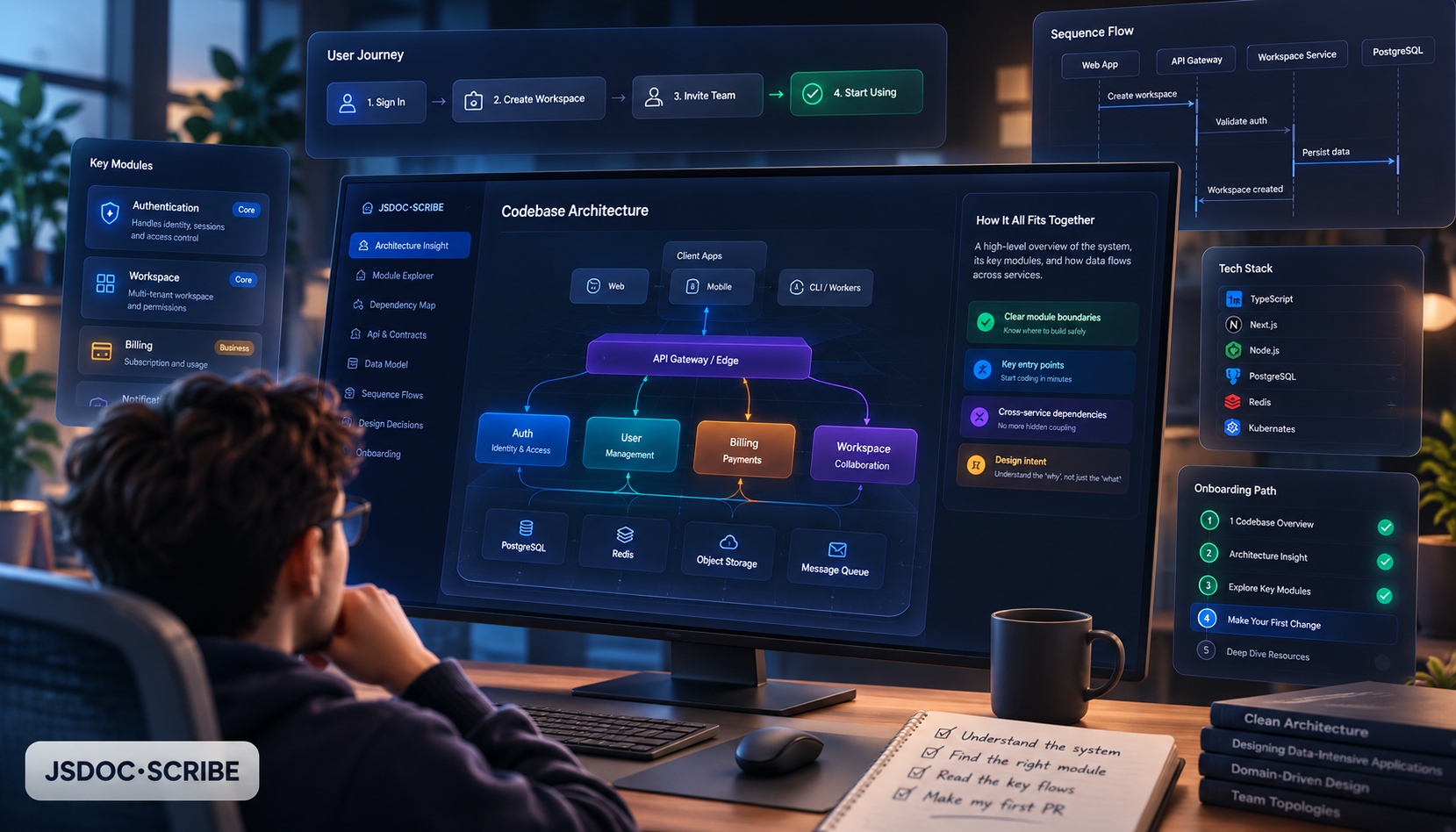
Industry-average time-to-productivity for a new engineer sits at two to four weeks. A meaningful chunk of that isn't spent writing code — it's spent figuring out what the codebase even is. Most onboarding guides now formalize this explicitly: days two and three of a structured plan are dedicated to architecture — how services talk to each other, where data lives, how changes get to production — before the new hire is trusted to touch the local environment on days four and five.
The problem is who runs days two and three. Usually it's a senior engineer, live, in a call, drawing boxes on a whiteboard from memory. It's the single most expensive hour in onboarding, because it's the one hour that can't be self-served — until the explanation itself is generated from the code instead of recalled from someone's head.
That's what jsdoc-scribe's Architecture Insight page is for. This post is a literal walkthrough of what it shows, using the shape of output a real project generates, so you can see exactly what replaces that whiteboard session.
What generates it, and when
Every site built with gen-docs since v2.4.8 includes this page automatically — no extra flag, no configuration. It's built entirely from static analysis of the project's actual folder structure and package.json, via the TypeScript compiler API used purely as a parser. No AI, no LLM, nothing sent anywhere. If a project has nothing detectable, the page is simply omitted rather than guessed at.
Section one: framework detection, with the evidence shown
The page opens by naming the detected framework — React, Next.js, Angular, Vue, Express, or NestJS — pulled directly from actual dependencies in package.json, not inferred from file naming conventions or folder guesses. For a NestJS API, that section reads something like: "Framework detected: NestJS", with the evidence line directly underneath — @nestjs/core and @nestjs/common present in dependencies, @Controller() and @Injectable() decorators found across N files. A new hire reading this on their first morning gets, in one paragraph, what would otherwise take a Slack message and a wait for a reply.
Section two: architecture-pattern signals, each with its own proof
This is the part that actually saves the whiteboard hour. The page scans across 23 recognized architecture patterns — Layered, MVC, Hexagonal, Onion, Repository, Vertical Slice, Feature-Based, Modular Monolith, Serverless, CLI tool, publishable library, monorepo, and more — and reports every one it finds a real signal for. Critically, none of them show up as a bare label. Each comes with the concrete evidence that triggered it:
- Layered architecture detected — evidence:
controllers/,services/,repositories/directories present with a consistent one-way dependency direction between them - Repository pattern detected — evidence: 6 files matching
*.repository.tsnaming convention, each wrapping direct database access behind an interface - Modular Monolith detected — evidence:
src/modules/contains 8 self-contained subdirectories, each with its own controller, service, and module definition file
That last bullet is the one that matters most for a new hire specifically: it answers "is this a monolith or microservices" — the single most common orientation question — with a structural fact, not an opinion someone on the team happens to hold.
Section three: the folder structure itself, in plain English
Below the pattern signals, the page walks the actual directory tree and narrates it — not a raw tree command dump, but a plain-English pass: what lives where, and why it's grouped that way based on what the analysis found. It's the difference between staring at a file explorer and having someone (or something) tell you what you're looking at.
Why "with evidence" is the whole point
It would be easy to build a version of this that just prints "this looks like a layered architecture" with no backing. That version is worthless the first time it's wrong, because a new hire has no way to check it without going and asking someone anyway — which defeats the purpose. Every signal on this page instead ships with the specific file, directory, or dependency that triggered it, which means a skeptical engineer can verify any claim in seconds instead of taking it on faith. That verifiability is also why this is safe to hand to a new hire unsupervised on day one: there's nothing on the page that's a guess dressed up as a fact.
What this replaces, concretely
Without it, the day-two-and-three architecture walkthrough usually looks like: a senior engineer blocks 45–60 minutes, screen-shares, narrates the folder structure from memory, and answers "wait, why is it split this way" in real time — an hour that comes directly out of that engineer's own output, and one that has to be repeated, nearly verbatim, for every single new hire.
With it, that hour becomes self-service. The new hire opens the docs site, reads the Architecture Insight page during onboarding setup on day one, arrives at the day-two conversation already oriented, and spends that senior engineer's time on the questions that actually need a human — the "why did we choose this over the alternative" judgment calls that no static analysis can answer, rather than the "what is this folder for" ones that it can.
Why this is worth taking seriously as a retention lever, not just a convenience
Teams running structured onboarding — architecture context included, not just access provisioning — see meaningfully better outcomes on two fronts that both show up on a P&L eventually: new hires with structured architecture documentation reach full productivity roughly 40% faster than those without it, and companies running structured onboarding programs overall retain 82% more of their new hires in the first year. Neither number is about the tool directly — they're about what happens when the "how does this system work" question gets answered accurately and immediately instead of slowly and informally. A generated, always-current architecture page is one of the cheaper ways to be on the right side of both numbers.
Bottom line
The Architecture Insight page isn't a replacement for judgment calls only a senior engineer can make — it's a replacement for the part of onboarding that's pure information transfer and shouldn't require a human in the loop at all. It ships automatically with every gen-docs build, costs nothing extra to generate, and every claim on it is backed by evidence a skeptical new hire can check for themselves in seconds.
npx jsdoc-scribe . --write            # try it once, no install
npm install --save-dev jsdoc-scribe   # add it to the project
Full docs at imchintoo.github.io/jsdoc-scribe, package on npm as jsdoc-scribe, source at github.com/imchintoo/jsdoc-scribe.